 GlyphIndex
Read the Unicode Inspector results
Learn what the Inspector’s counts mean, find an unexpected space or joiner, and export the complete results.
ON THIS PAGE
Inspect a known sample first
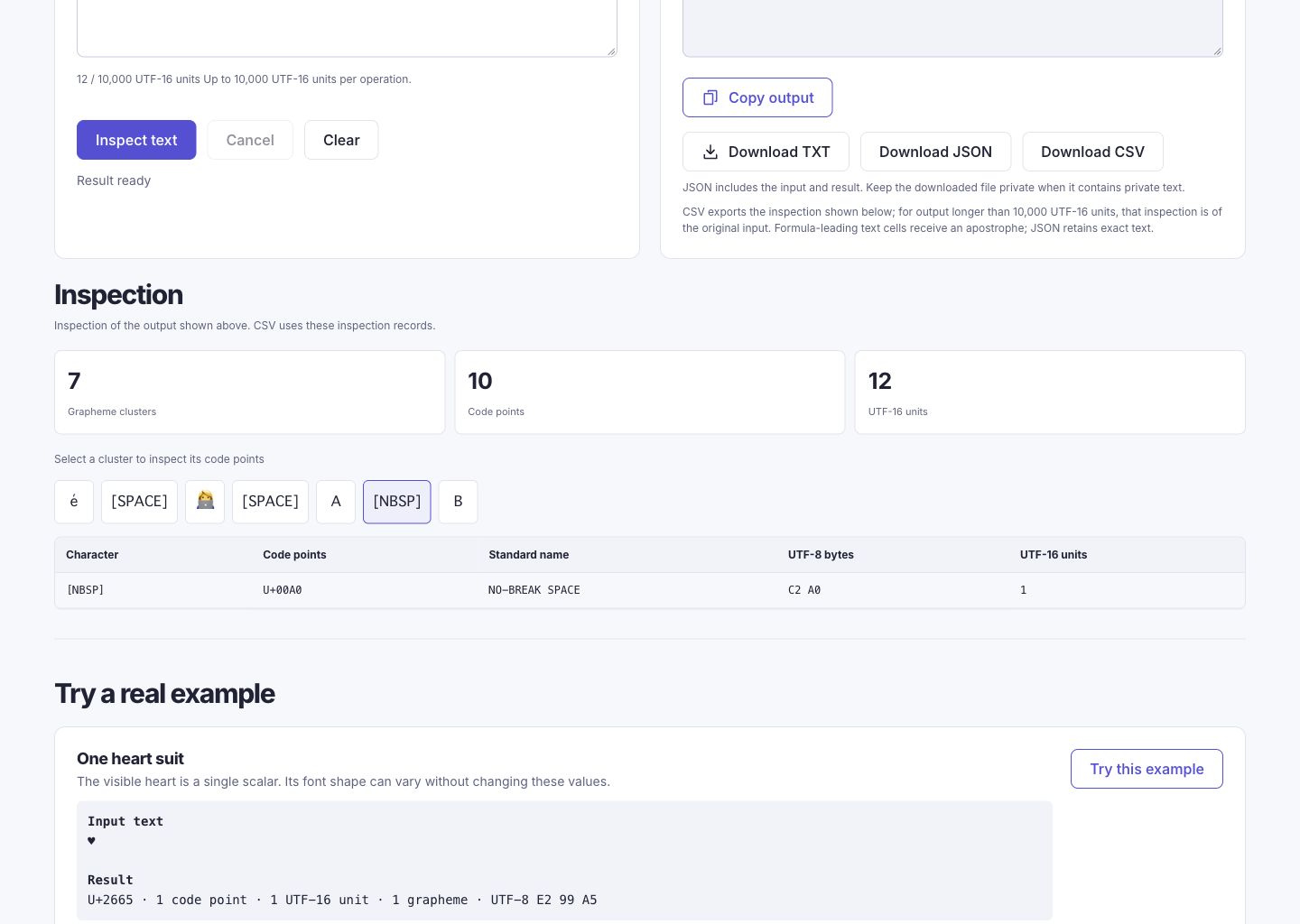
Paste the sample below into Unicode Inspector and choose Inspect text. It contains an accented e, a joined emoji, and A and B separated by a no-break space. The input stays as entered; the visible markers in the results explain characters without adding them to your text.
é 👩💻 A BFor the complete sample, expect 7 grapheme clusters, 10 code points, 12 UTF-16 units, and 20 UTF-8 bytes in a browser that supports the joined emoji sequence. To understand each part, inspect the following samples separately.
| Sample | Code points | UTF-16 units | Grapheme clusters |
|---|---|---|---|
| é | U+0065 U+0301 | 2 | 1 |
| 👩💻 | U+1F469 U+200D U+1F4BB | 5 | 1 |
| A B | U+0041 U+00A0 U+0042 | 3 | 3 |
Read each count for its own purpose
| Field | What it tells you | Use it for |
|---|---|---|
| Grapheme clusters | Text segments reported by the browser’s Intl.Segmenter. | Locating a visible unit that may contain several code points. |
| Code points | The Unicode values in the string, with invalid sequences distinguished. | Comparing exact characters or finding an extra joiner or selector. |
| UTF-16 units | The units used by JavaScript strings. | Explaining why a supplementary character can count as two units. |
| UTF-8 bytes | The encoded byte sequence for valid text. | Comparing an expected byte value without guessing from the glyph. |
These counts answer different questions. The emoji sample has three code points and five UTF-16 units. A browser supporting the grapheme rules for this sequence reports one cluster. A count is not a measure of visual width. A grapheme is also not a guarantee that every font will display a joined image.
Locate an unexpected sequence
Choose a grapheme button to see the values it contains. In é, U+0301 follows U+0065. In 👩💻, a zero width joiner connects the emoji components. In A B, the middle character is a no-break space, U+00A0, rather than the ordinary U+0020 space.
| Value to inspect | Expected UTF-8 | Comparison |
|---|---|---|
| U+00A0 NO-BREAK SPACE | C2 A0 | U+0020 SPACE has the single byte 20. |
| U+202F NARROW NO-BREAK SPACE | E2 80 AF | It is a different value from U+00A0 even when both appear as gaps. |
| U+200D ZERO WIDTH JOINER | E2 80 8D | A visible marker in the result is explanatory and is not part of copied input. |
Read its role and compare the actual character.
No-break spaceCompare the ordinary and nonbreaking spaces.
Copy a value without changing the original
To copy an individual code-point value, select the text in its table cell and use your device’s Copy command. The table does not have a separate copy button for each value. Copy output copies the inspector’s complete original text, not the selected cell or cluster. Read the copied form in its destination. Do not remove all invisible values automatically; joiners, selectors, and combining marks can be intentional.
Read and export longer results
The page displays up to 200 code-point rows and 100 grapheme buttons. Reaching either display limit does not mean that the remaining input was removed. The summary still describes the complete inspection; Download JSON and Download CSV include all inspection records. Download TXT keeps the original text. Each input is limited to 10,000 UTF-16 units.
Sources and method
- Unicode Standard Annex #29: Text Segmentation — Background for grapheme boundaries; the running browser supplies Intl.Segmenter.
- Unicode: UTF-8, UTF-16, UTF-32 and BOM — How code points are represented as encoding units and bytes.
- Unicode: Characters and Combining Marks — Character sequences and displayed text elements are different concepts.
- Unicode Technical Standard #51: Unicode Emoji — Text and emoji presentation sequences and variation selectors.